 Stowick Labels
Moving from Retail Barcode Labels to Stowick Labels
If you print labels today with Shopify's Retail Barcode Labels app, here is how your setup carries over. You keep your barcodes, your Avery 5167 sheets and your printer.
Avery 5167 is a built-in template
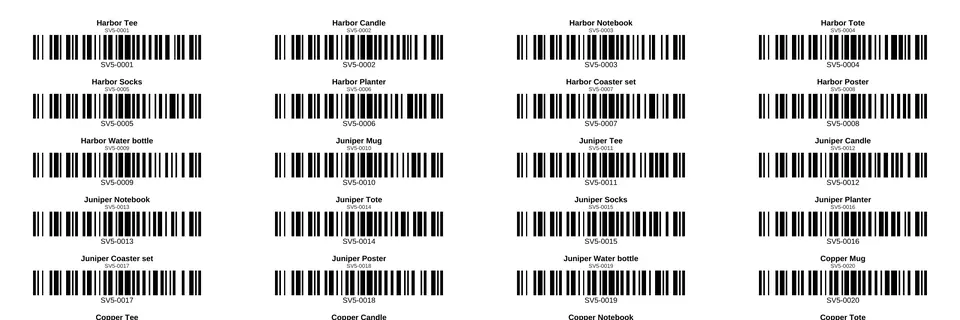
Pick Avery 5167 / 8167, 80 per sheet, 1¾ × ½ in in the template list. The sheet below is a real PDF made in the app on our test store, cropped to the first rows. We scanned every barcode on the page: all 50 read back the right SKU.
Fonts
Labels use Helvetica and Helvetica Bold, the standard PDF fonts every PDF viewer and printer driver has, so text prints the same on any computer. Accented letters used in Western European languages (é, ñ, ü, ß, ø, æ), curly quotes, en and em dashes, ½, °, € and ™ print as typed. There are two text sizes, and a name that is too long for the label is shortened with “…” instead of running off the edge.

Not supported yet: letters outside the Western European set, such as č or ř. They print as “?”.
Your label sizes
| Label you use now | Pick this in Stowick Labels |
|---|---|
| Avery 5167 (1.75" × 0.5") | Avery 5167 / 8167, 80 per sheet |
| Avery 5160 (2.63" × 1") | Avery 5160 / 8160, 30 per sheet |
| Dymo 30252 (3½" × 1⅛") | Dymo 30252 |
| Dymo 30336 (2⅛" × 1") | Dymo 30336 |
| Zebra 2" × 1" rolls | 2 × 1 in roll |
| Any other size (for example 1" × 1" or 2.25" × 0.75") | Custom size: enter the label width and height in inches or mm |
How to move
- Install Stowick Labels from the Shopify App Store. It runs inside your Shopify admin.
- Nothing to export or import. Retail Barcode Labels saves the barcodes it creates on your products in Shopify (its help page says it assigns the variant's barcode). Stowick Labels reads the barcodes, SKUs and prices from those same products.
- Same barcode type. Its barcodes are Code 128. Stowick Labels prints those numbers as Code 128 too; valid UPC and EAN-13 numbers keep their retail format.
- Choose what goes on the label: name, variant, SKU, price, compare-at price, vendor and the barcode with its numbers. Save it as a setup to reuse.
- Add products by search, collection or everything, with quantity 1 each or quantity = stock on hand. Then download the PDF and print at 100% (actual size).
- Partly used sheet? Start on any label position, so the used labels are skipped.
Products with no barcode can use the SKU as the barcode, or you can create in-store barcodes and save them to Shopify from the app.
Install it from the Shopify App Store
Free for 50 labels a month; Pro is $7.99/month with a 14-day free trial. Questions about moving? Email support@getstowick.com.